
Have you ever wondered what the Journal Entry feature in MonsoonSIM is?
Well, all the answers to your questions can be found here!
As the primary record of all financial transactions of a business, journal entries are used to record daily financial transactions to analyze how they impact a business. In addition, journal entries are then used to construct financial statements, some of them being profit and loss statements, balance sheets and cash flow statements.
Learning Journal Entries with MonsoonSIM
Understanding vital and relevant concepts in accounting and business can be done through the assistance of MonsoonSIM.
In each recorded journal entry, it involves debit and credit, which must be equal according to the accounting equation of assets equivalent to liabilities and equity. Thus, debit and credit must remain in balance.
Understanding this vital and relevant concept in accounting and business can be done through the assistance of MonsoonSIM. Some asset account which can be found within the business simulation and learning experience include cash on hand, procurement of finished goods, procurement of raw materials, machines, account receivables, prepaid accounts, accumulate depreciation and more.
From these concepts that learners are exposed to as they run the simulation, it helps solidify the basic understanding that an increase in assets go to debit whilst a decrease in assets go to credit.
Debit and credit can also be observed in the revenue account of MonsoonSIM, providing another learning opportunity for students to know and master retail revenue, wholesales (B2B) revenue, e-commerce revenue, service revenue, forex gain or loss, and more.
Essentially, if revenues increase, it would go to credit. Generally-speaking, revenues will always g to credit, unless there’s some special cases, such as the return or refund of a set of sold items (the revenue must then be debited to correct the returned items).
Operating expense also involves debit and credit. MonsoonSIM’s expense account offers students the possibility of exploring the different varieties of expenses, namely salary, rental, overflow, marketing, interest, shipping, penalty, maintenance, human resource and depreciation, and more.
What must be important to note is that expenses will always go to debit (so, debit increases), though there are certain special cases which this rule does not apply. Since that is a more intermediate case, MonsoonSIM’s journal entry does not involve these special cases.
Finally, debit and credit can also be seen in liabilities. The liabilities account of MonsoonSIM includes account payables, overdraft and loans. To put it simply, if liabilities increase, it goes to credit; whilst if liabilities decrease, then that goes to debit.
Enhance your facilitation skills with our comprehensive step-by-step guide
Teach Journal Entries with Simulation Games
Now that these basic components of MonsoonSIM’s journal entry has been covered, the next question is how to do the journal posting in MonsoonSIM?
The steps are simple and user-friendly.
- Go to “Transaction List”
- If there’s any unposted journal, the “Journal Posting” button will appear. One must click it in order to start posting.
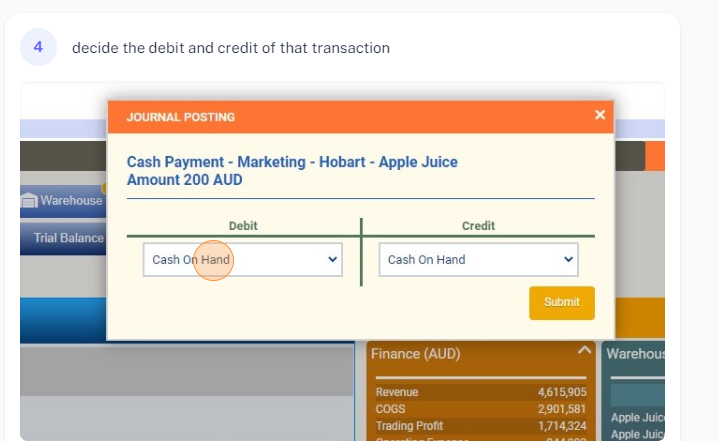
- Assess the transaction and then select the correct account before submitting. The account list has been divided into categories of Assets, Operating Expense and others to make it simpler.
- It takes 1 day for the system to determine whether the answer was correct or not. The person who posted the journal entry and the time at which it was posted can be found on the same row.
- When it comes to the result, an X sign marks that the chosen account was wrong. If this happens, the Journal posting button will appear and learners can try again. On the other hand, a tick sign means that the correct account has been chosen. Once this happens, it will be marked as ‘completed” by the system.
Congratulations on finishing the reading about MonsoonSIM’s journal entry! You are now ready to start posting your own journal entry and discover more about accounting and business concepts in a way where there’s more to learn, easier to learn.
How to Teach and Learn Accounting with Simulation: This article discusses how MonsoonSIM’s Finance Module offers hands-on accounting experience, integrated reporting, money management, and financial intelligenc
MonsoonSIM's journal entry feature offers students the possibility of exploring the different varieties of expenses and revenues, thereby solidifying their understanding of debit and credit in business transactions.
Further Readings:
How to Teach and Learn Accounting with Simulation: This article discusses how MonsoonSIM’s Finance Module offers hands-on accounting experience, integrated reporting, money management, and financial intelligence
For a deep dive into the world of experiential business education, explore MonsoonSIM's approach to simplifying business simulations in Business Simulations Made Simple [Updated 2023]
Frequently Asked Questions
What is MonsoonSIM's Journal Entry feature? It's a simulation tool for recording financial transactions. Learn more about it in our guide to MonsoonSIM's financial modules.
How does the Journal Entry function support accounting education? It offers hands-on experience in financial record-keeping, complementing our educational resources on MonsoonSIM.
Can I use MonsoonSIM's Journal Entry for my business classes? Absolutely, it's designed to enhance business curriculum. Check out how it's used in real class scenarios.
For further information on utilizing MonsoonSIM's Journal Entry feature, please refer to our detailed introduction here.
How can I sign up for the MonsoonSIM Free Trial
Visit the MonsoonSIM Free Trial Page and fill out the form to get started.