The following describes the operating model of the MonsoonSIM e-commerce module.
Seller web market rating:
There is a simple system-controlled 5-star rating, a rating of 0 to 5 stars will be automatically assigned to the seller in the web market. A rating of 0 indicates poor performance, while a rating of 5 means excellent performance.
The ratings consist of:
- Rating of 0 star - for wrong items shipped
- Rating of 1 star - for extremely late delivery
- Rating of 2 stars - for very late delivery
- Rating of 3 stars - for late delivery
- Rating of 4 stars - for slightly late delivery
- Rating of 5 stars - for on-time delivery
The rating is automatically assigned based on the delivery date and items delivered. Neither learners nor certified trainers can control it.
As a buyer:
- You can browse for items for sale by clicking "Web Market."
- After that, you can click "we buy."
- After clicking "we buy," you need to choose the destination of the goods.
- Purchasing will trigger a Purchase Order.
- A seller should deliver the items within the days promised. Some deliveries may be late, while some deliveries are on schedule.
- If the goods arrive late, the system will assign a rating for the seller using a typical 5-star system.
- Learners are not able to control the rating.
- Upon receiving the goods, the system will automatically give a rating to the seller based on their delivery time.
As a seller:
- You can browse for items for sale by clicking "Web Market."
- After that, you can click "we sell."
- After clicking "we sell," you need to allocate the goods.
- Selling will trigger a Sales Order.
- A seller should deliver the items within the days promised. Some deliveries may be late while some are on schedule.
- If the buyer suddenly experiences bankruptcy or doesn't have enough cash to pay the seller, the SO will be automatically canceled within specific days.
- If the goods arrive late, the system will assign a rating for the seller using a typical 5-star system.
- Learners are not able to control the rating.
- Upon receiving the goods, the system will automatically give a rating to the seller based on their delivery time.
- To improve the rating, the seller has to meet the delivery deadline.
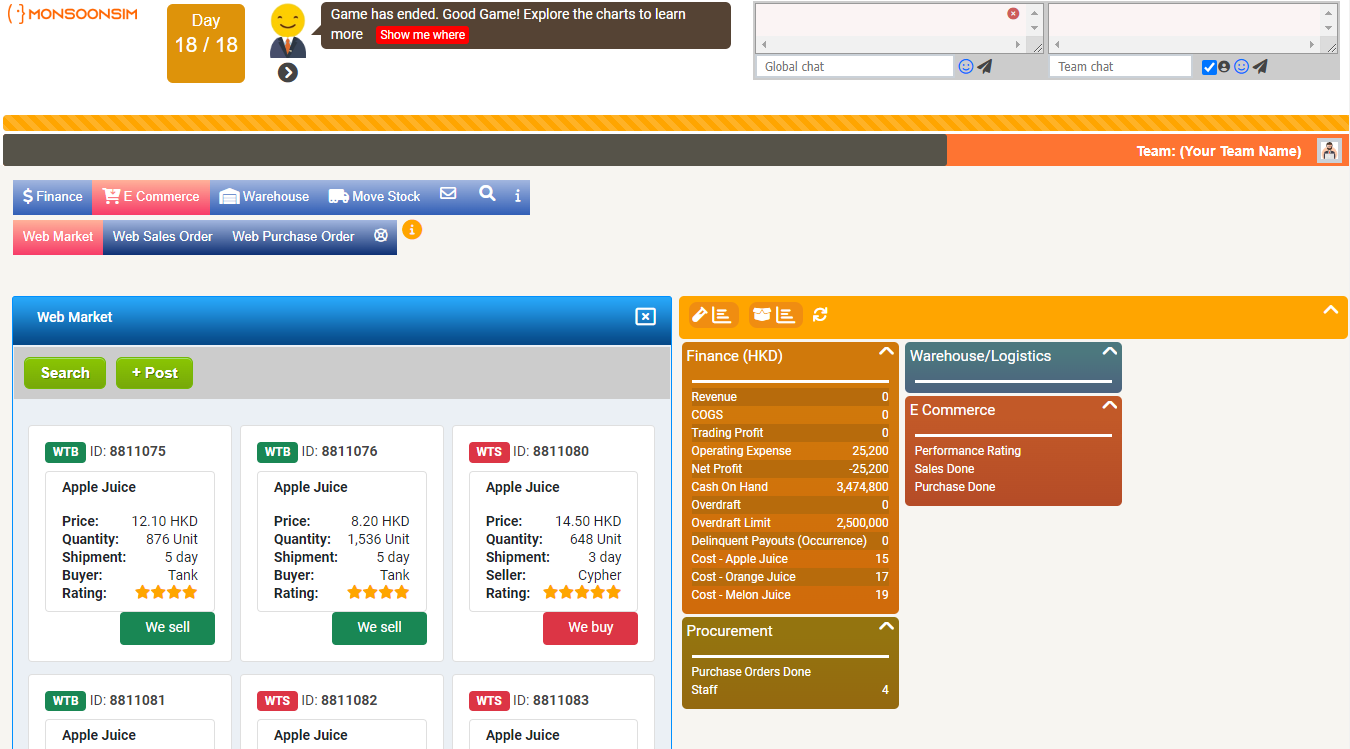
To become a web market seller:
On the e-commerce tab, you can search for a product you want to sell and look for available offers from the buyer.
- If the buyer cannot pay for the goods within specific days, the allocated goods will return to the seller.
- If the seller neglects the accepted order for too long, the system will cancel the order.
Additionally, you can post the items you want to sell and set the selling price, estimated delivery time, etc. Then, your post will appear in the seller section.
To become a web market buyer:
On the e-commerce tab, you can search for a product you want to buy and look for available offers from the seller.
- If the buyer cannot pay for the goods within specific days, the allocated goods will return to the seller.
- If the seller neglects the accepted order for too long, the system will cancel the order.
- A seller who has done a successful transaction before will have a star rating visible, so you can also decide based on the rating.
- Additionally, you can post the items you want to buy and set the buying price, deadline, etc. Then, your post will appear in the buyer section.